


Understanding the Basics of Motion Sensors
Motion sensors are a fascinating piece of technology. They detect movement and have become essential in various fields. From home security to business automation, their applications are vast.
These sensors come in different types, each with unique features. Zigbee motion sensors, for example, are known for their low power use and wireless capabilities. Infrared sensors, on the other hand, detect motion by sensing heat changes.
Incorporating motion sensors into home automation systems can enhance convenience and security. They can automate lighting, control appliances, and even send motion alerts to your smartphone. This makes them a valuable addition to any smart home setup.
Businesses also benefit from advanced motion sensors. AI motion sensors for business can optimize operations and improve security. They are a key component in creating efficient and responsive environments.
Understanding motion sensors is crucial for anyone interested in modern technology. They are versatile, reliable, and continue to evolve, offering more precise solutions for various needs.
What Are Motion Sensors?
Motion sensors are devices designed to detect physical movement in a specific area. They trigger actions when motion is sensed, playing a vital role in many systems. These sensors are commonly found in security setups to prevent unauthorized access.
There are various kinds of motion sensors, each designed for specific tasks. They can detect movement using different technologies, like infrared sensing or microwave detection. This makes them adaptable for diverse applications.
Common types of motion sensors include:
- Passive Infrared (PIR) sensors
- Ultrasonic sensors
- Microwave sensors
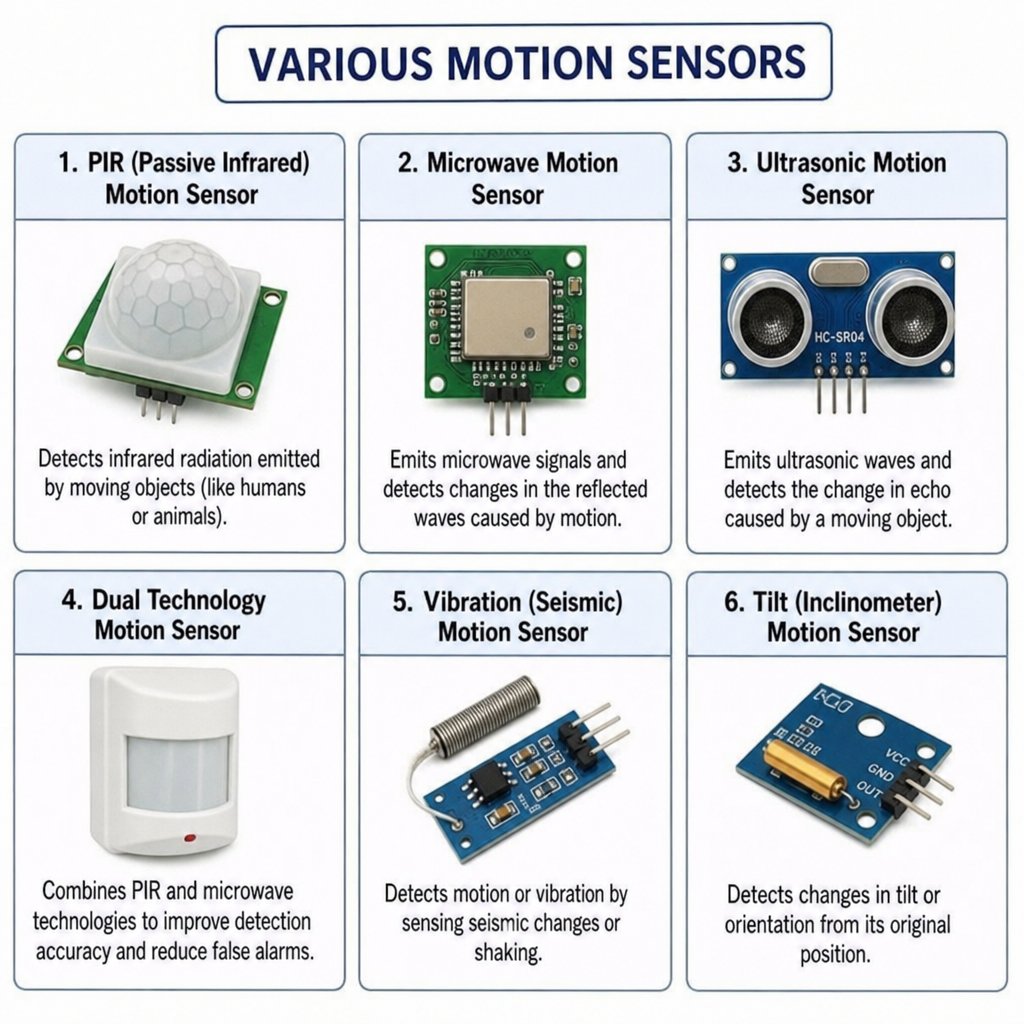
Each type works on a distinct principle to detect motion accurately. For instance, PIR sensors detect changes in infrared radiation levels, indicating motion.

In addition to security uses, motion sensors can automate lighting, enhancing energy efficiency. They help reduce unnecessary energy use by activating devices only when needed. Motion sensors are indeed a smart choice for modern homes and businesses.
How Do Motion Sensors Work?
Motion sensors operate by detecting changes in the environment to identify movement. They use different technologies to achieve this, each with distinct mechanisms. These technologies enable precise motion detection tailored to specific needs.
For instance, infrared sensors detect movement by sensing heat changes. They recognize fluctuations in the infrared radiation produced by objects. This makes them effective for identifying warm bodies, such as humans or animals.
Meanwhile, microwave sensors emit radio waves and measure the reflection to detect motion. They are sensitive to slight movements, making them suitable for various applications.
The motion detection processes can include:
- Sensing changes in temperature
- Sending and receiving sound waves
- Measuring radio wave reflections

Each method provides unique advantages, making motion sensors versatile for both residential and commercial use. Their efficient operation enables a wide range of functionalities in modern technology systems.
Types of Motion Sensors
Motion sensors come in various types, each utilizing specific technologies to detect movement. Their diverse forms allow them to cater to different environments and requirements. Understanding these types helps in choosing the right one for a particular application.
Infrared sensors are among the most common, detecting motion through heat changes. These sensors are popular in residential security systems due to their effectiveness in recognizing human presence.
Ultrasonic motion sensors operate by emitting sound waves. They detect motion when there’s a change in the frequency of the returned waves. This makes them effective for indoor applications where precise detection is necessary.
Microwave sensors, similar to ultrasonic sensors, emit waves, but use microwave frequencies. They are highly sensitive and can detect motion through various materials. This makes them ideal for comprehensive security solutions.
Other types include dual technology sensors, which combine multiple detection methods. These provide more accurate motion detection and reduce false alarms by cross-verifying signals.
Some common types are:
- Passive Infrared (PIR) Sensors
- Ultrasonic Sensors
- Microwave Sensors
- Dual Technology Sensors

Each type brings unique capabilities, offering versatility for numerous applications, from security to automation. Selecting the right sensor type ensures optimal performance tailored to specific uses.
Key Features and Technologies
Motion sensors incorporate various features and technologies to enhance their effectiveness and adaptability. Understanding these features can assist users in leveraging the full potential of these devices.
Advanced motion sensors often include customizable sensitivity settings, allowing users to adjust detection levels based on their needs. This is crucial for minimizing false alarms and ensuring efficient operation.
Many modern sensors also integrate with smart home systems, offering seamless connectivity and control. This enables users to monitor and manage their motion sensors remotely, often via mobile apps.
Key features include:
- Adjustable Sensitivity
- Smart Home Integration
- Remote Monitoring Capabilities
These technologies contribute to more reliable, user-friendly, and adaptable motion detection solutions.
Applications of Motion Sensors
Motion sensors offer versatile applications across different sectors. Their use extends far beyond basic security needs, making them indispensable in various fields.
In homes, motion sensors automate lighting and climate control systems. They enhance convenience and energy efficiency by activating devices only when movement is detected.
Businesses leverage ai motion sensors to optimize operations. They monitor foot traffic, enhancing retail layout decisions and occupancy management. This application helps increase customer satisfaction and reduce energy costs.
Other applications include:
- Automotive Systems
- Smart Cities
- Sports and Fitness
In security, they’re an essential component. Motion sensors trigger alarms and alerts, providing real-time updates. This capability ensures property safety and peace of mind.

Benefits of Using Motion Sensors
Motion sensors offer numerous benefits that improve both security and efficiency. Their ability to detect movement is critical for safeguarding environments.
Energy conservation is a significant advantage. Motion sensors help reduce costs by turning off lights and devices in unoccupied spaces. This automation aids in creating energy-efficient homes and businesses.
Beyond energy savings, they boost safety and convenience. By integrating with automation systems, motion sensors simplify daily routines and protect against intrusions.
Some key benefits include:
- Enhanced Security
- Energy Efficiency
- Convenience and Automation
Motion Sensors in Home Automation and Security
Motion sensors are a cornerstone of modern home automation. They seamlessly integrate with smart systems to enhance convenience. From controlling lighting to adjusting thermostats, these sensors enable a smarter home environment.
In terms of security, motion sensors are invaluable. They detect unauthorized activity and can trigger alarms or alerts, offering peace of mind. Their presence is vital for safeguarding property against intrusions.
For an effective home automation setup, consider using:
- Zigbee Motion Sensors
- Wireless Sensors with Alarms
- AI-based Security Sensors

Advanced Motion Sensor Solutions
The latest motion sensor solutions incorporate cutting-edge technologies. These advancements offer enhanced accuracy and reliability. AI-enhanced sensors, for example, can differentiate between humans and pets, reducing false alarms.
Dual technology sensors are another innovation, combining various detection methods for superior performance. Businesses also benefit from these advanced solutions, optimizing security and operational efficiency.
Consider these advanced options:
- AI Motion Sensors
- Dual Technology Sensors
- Occupancy Sensors
Choosing the Right Motion Sensor
Selecting the right motion sensor depends on your needs. Consider the environment and specific use cases. Not all sensors suit every application, so careful selection is key.
Analyze these factors before purchasing:
- Intended Use (home, office, business)
- Detection Range
- Integration Capabilities with Existing Systems
Conclusion
Motion sensors are essential in modern technology. They provide security, convenience, and energy efficiency. From home automation to business applications, their versatility is unmatched.
Choosing the right type ensures maximum effectiveness and integration with your system. With advancements in AI and smart technology, the future of motion sensors is promising and exciting. They will continue to innovate our everyday experiences.