


Choosing the Right IP Cameras for Security
Choosing the right IP cameras for security is crucial for protecting your property. These digital cameras transmit data over a network, offering high-resolution images.
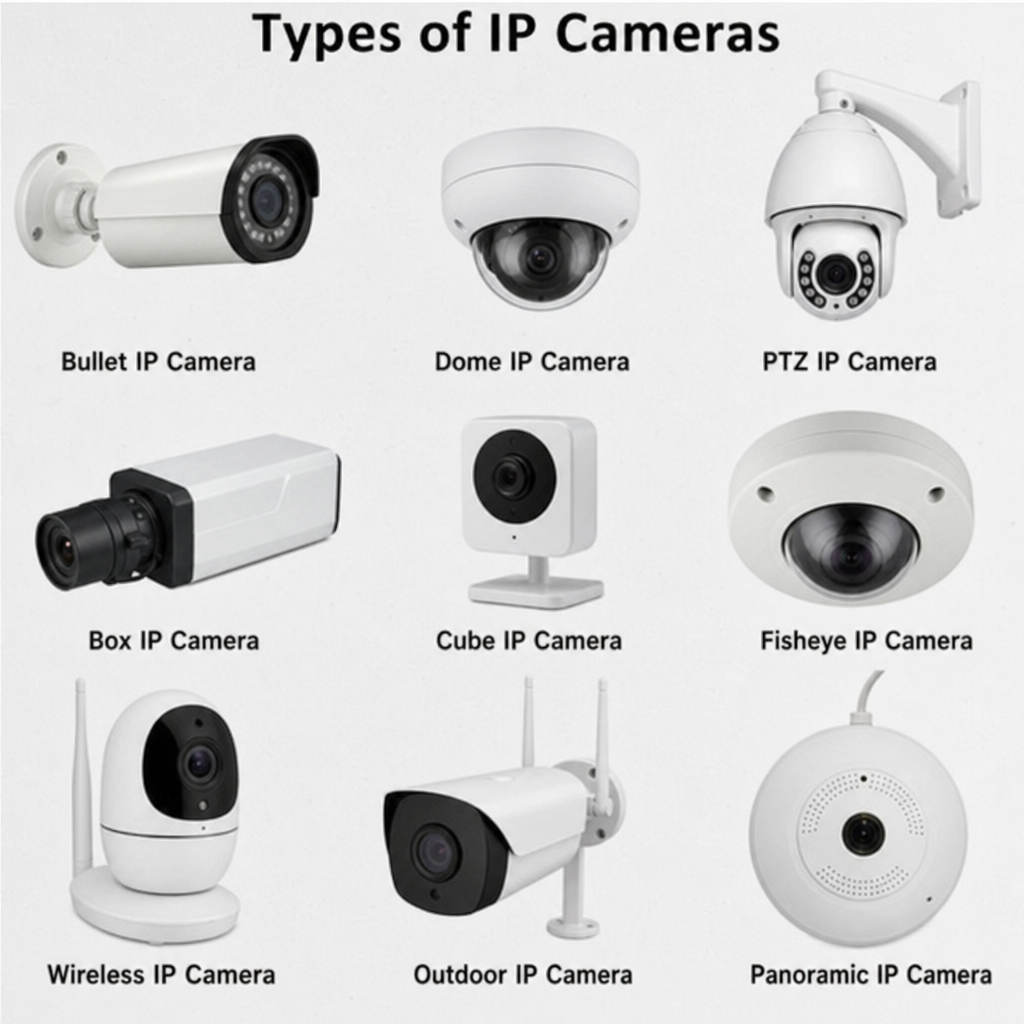
IP cameras come in various types, including dome, bullet, outdoor, and wireless models. Each type serves different security needs and environments.
Understanding the features of IP cameras can help you make an informed decision. Key features include night vision, motion detection, and remote access.
Installation options vary, from wired to wireless and PoE (Power over Ethernet) setups. Each has its own benefits and challenges.
This guide will help you navigate the world of IP cameras. You’ll learn about types, features, and installation tips to enhance your security system.
What Are IP Cameras and How Do They Work?
IP cameras are advanced security devices that capture and transmit video over a network. Unlike analog cameras, they offer superior image quality. This makes them ideal for various security applications.
These cameras connect to your network using either wired or wireless options. Through this connection, they send video data to storage devices or cloud-based systems. This flexibility allows users to access footage remotely.
An IP camera’s data transmission utilizes the Internet Protocol (IP), hence the name. This protocol ensures reliable and efficient data delivery. Here are some key aspects of how IP cameras operate:
- High-resolution video capture
- Real-time video streaming
- Data transmission via network
IP cameras require IP addresses to function within a network. The default IP address for many Bosch cameras is 192.168.0.1. Similarly, Axis cameras typically use 192.168.0.90.

Understanding how IP cameras work can guide your choice in selecting the right model. Features like night vision and motion detection enhance their utility. In essence, these cameras are crucial for modern security systems.
Types of IP Cameras: Dome, Bullet, Outdoor, and Wireless
IP cameras come in various types, each tailored for specific security needs. Dome cameras are popular for their discreet design and wide-angle coverage. They are ideal for monitoring large areas efficiently.
Bullet cameras, named for their cylindrical shape, are known for their long-range focus. These cameras are excellent for perimeter monitoring and are often found in outdoor settings. They are designed to withstand harsh weather conditions.
Outdoor IP cameras are specifically built for durability. They include features like waterproof casings and night vision. These cameras ensure clear images in various lighting conditions.
Wireless IP cameras provide flexibility during installation. Without needing extensive wiring, they are perfect for areas where cable installation is difficult. This makes them a favorite in many residential setups.
Here are key features of these types:
- Dome cameras: Discreet, wide coverage
- Bullet cameras: Long-range, durable
- Outdoor cameras: Weatherproof, night vision
- Wireless cameras: Easy installation, flexible placement

Selecting the right type of IP camera involves assessing your specific security needs. Whether for indoor or outdoor use, understanding these types helps in making informed decisions. Each camera type offers unique benefits suitable for different environments.
Key Features to Look for in IP Cameras
Choosing the right IP camera depends on understanding its key features. High resolution is crucial for capturing clear images, particularly for identifying faces and small details. Consider cameras with at least 1080p resolution for clarity.
Night vision is another important feature, especially for outdoor IP cameras. It allows the camera to capture images in low light or complete darkness. Look for cameras that offer infrared technology or low-light sensors for effective nighttime monitoring.
Motion detection is essential for security purposes. This feature triggers alerts and records only when motion is detected, saving storage space. Advanced cameras can distinguish between humans, animals, and objects, reducing false alarms.
Remote access is a highly-valued feature of modern IP cameras. It allows users to monitor their property from anywhere using smartphones or computers. This feature also enables real-time alerts and video playback, enhancing security management.
Some notable IP camera features include:
- Resolution: High-definition clarity
- Night vision: Effective in low light
- Motion detection: Triggers alerts and saves storage
- Remote access: Monitor from anywhere

These features can significantly enhance the functionality of IP cameras. It is essential to align these features with your specific security needs for optimal protection.
Comparing IP Cameras: Price, Performance, and Reviews
When choosing an IP camera, compare prices, performance, and user reviews. Price can vary based on features, brand, and build quality. It’s important to balance cost with desired features to get the best value.
Performance is key for effective surveillance. Consider the camera’s resolution, frame rate, and field of view. Higher resolution and frame rates provide better image quality and smooth video playback. A broad field of view ensures more area coverage, reducing blind spots.
Reviews offer insights into real-world performance and reliability. Look for cameras with positive feedback regarding durability, ease of use, and after-sales support. Negative reviews may highlight potential issues that could affect your decision.
Using a checklist can help in the selection process:
- Price: Ensure features match cost
- Performance: Evaluate resolution and coverage
- Reviews: Consider user experiences

A thoughtful comparison of IP cameras helps identify the best option for specific security needs. Make informed decisions by considering how each aspect aligns with your requirements.
Installation Tips: Wired, Wireless, and PoE IP Cameras
Installing IP cameras can vary based on the type of system you choose. Wired installations offer reliability but require more effort. Running cables for power and data can be labor-intensive. However, they provide stable connections and are less susceptible to interference.
Wireless IP cameras simplify installation by eliminating extensive wiring. They are ideal for locations where running cables is impractical. Placement flexibility is a significant advantage. Ensure strong Wi-Fi coverage for uninterrupted performance. Remember, batteries may need regular charging or replacement.
PoE (Power over Ethernet) cameras combine the best of both worlds. They use a single cable for both power and data. This reduces clutter and simplifies the setup process. A PoE switch is needed, which might increase the initial cost but enhances convenience and reliability.
Here’s a handy checklist for camera installation:
- Wired: Requires planning and cable management
- Wireless: Easy to set up, check Wi-Fi strength
- PoE: Efficient, needs PoE-capable networking equipment

Each type of installation has its merits. Consider your environment and technological familiarity when choosing the appropriate method. Properly installed IP cameras ensure optimum security coverage.
Smart IP Cameras and Advanced Security Features
Smart IP cameras bring cutting-edge technology to your security system. These cameras integrate with home automation systems for seamless operation. They provide not only surveillance but also added convenience.
Many smart cameras offer advanced features like facial recognition. This allows you to identify specific individuals and receive tailored alerts. Some models include AI-driven analytics for detecting unusual activities. These features enhance the camera’s ability to provide security insights.
Another advantage is the capability for real-time monitoring and remote access. You can view live footage from your smartphone or computer. This means you stay informed, no matter where you are. These features empower you to respond quickly to security alerts.
Consider these smart features when choosing an IP camera:
- Facial Recognition: Identifies and distinguishes individuals
- AI Analytics: Detects unusual activity patterns
- Remote Access: Monitor from anywhere, anytime

Smart IP cameras offer more than just surveillance. They enhance your security system’s efficiency and your peace of mind. Embrace these advanced features for a comprehensive security solution.
Commercial vs. Residential IP Security Cameras
Commercial IP security cameras differ from residential ones in several key aspects. Businesses usually need more robust surveillance solutions. These cameras often support large-scale security operations. High-resolution imaging and extensive storage are common for business needs.
Commercial cameras are designed to cover vast areas and varied environments. Features like wide dynamic range and night vision are typical. They ensure clear footage in challenging conditions. Conversely, residential IP cameras focus on simplicity and ease of use.
Residential cameras often offer easier installation and user-friendly interfaces. They integrate well with smart home systems. Homeowners usually prioritize features like wireless capability and remote monitoring. This is crucial for managing security on the go.
When comparing commercial and residential IP cameras, consider:
- Coverage Needs: Extensive for commercial, specific for residential
- Feature Requirements: Advanced for businesses, basic for homes
- Installation Complexity: Professional for businesses, DIY-friendly for homes

Choosing the right type ensures your security system meets your specific needs. Focus on the unique requirements of your environment and setup.
Frequently Asked Questions: Default IP Addresses, Storage, and More
Understanding default IP addresses is crucial for setting up cameras. Many brands have specific default IP addresses. For example, the default IP address for Bosch cameras is often 192.168.0.1. Similarly, Axis cameras usually default to 192.168.0.90.
Storage options vary widely among IP cameras. Some offer local storage via SD cards. Others provide cloud storage, allowing remote access to footage. Consider both the cost and convenience of these storage solutions. Assess your need for accessibility and backup.
Here are more FAQs and tips when dealing with IP cameras:
- What is the default IP for Bosch cameras? Often 192.168.0.1.
- Do all cameras offer cloud storage? Not all; check specifications.
- How to change default IP? Usually through the camera’s settings interface.
Make sure to research each camera’s specifics before purchase. Knowing these details can make a significant difference in setup and use.
Choosing the Best IP Cameras for Your Needs
Selecting the right IP cameras involves careful consideration of various factors. First, identify your specific security needs. This will guide you in narrowing down features that are essential.
Consider the environment where the cameras will be installed. For example, outdoor IP cameras must withstand weather conditions. Look for features like weatherproofing and night vision in these scenarios.
Budget is another important consideration. Prices for IP cameras can vary widely based on brand, features, and type. Aim to balance affordability with quality to ensure reliable performance.
To aid in decision-making, consider these factors:
- Resolution Requirements: Higher resolution offers better image quality.
- Installation Type: Decide between wireless and wired setups.
- Integration Capability: Consider smart home integration and connectivity.

User reviews and camera comparisons can provide insights into the performance and reliability of various models. Assess these evaluations to make an informed choice. Ultimately, the best IP cameras will meet both your current and future security needs efficiently.
